Every Planio account comes with an endpoint for the Model Context Protocol (MCP), the open standard that connects AI assistants to the tools you already use. Connect the assistant of your choice to your-account.planio.com/mcp and ask it about your projects in plain language: what changed this week, what is blocked, what a 14-note issue is actually about. Your data stays on Planio’s servers until you authorize an assistant to fetch it – and only within the permissions you grant. Currently in beta, included in all plans.
Ask, Don’t Dig
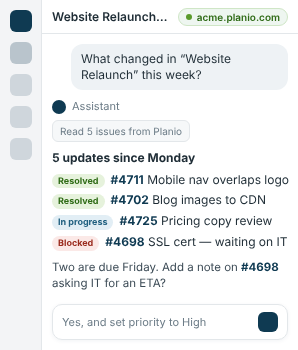
A project with hundreds of issues, an issue with months of discussion: instead of scrolling, ask. Your assistant reads the relevant issues, notes and wiki pages through Planio’s API and answers with a status breakdown, a summary or a list of open questions. It sees exactly what your user account may see – no more, no less.
Turn Notes Into Work
Give your assistant write access and it does the typing: issues from meeting notes, tasks from a pasted e-mail, a wiki page from a photo of the whiteboard, status changes in bulk. Every change is made through the API in the name of the connected user and shows up in the activity log like any other edit – reviewable, revertible.
You Decide What It May Do
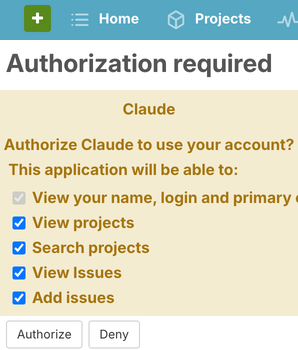
An administrator enables the MCP endpoint under Administration → Settings → API and can restrict it to read-only mode for the whole account. Each user then connects their own assistant via OAuth and chooses the scopes: read issues, create issues, edit wiki pages… Access can be reviewed and revoked at any time under My Account → Authorized Applications. Nothing is shared with any AI company unless a user explicitly connects one.
Works With the Assistant You Already Use
MCP is an open standard, so you are not locked into one vendor. Planio connects to Claude (web, desktop and Claude Code), ChatGPT, Mistral Le Chat, Cursor, Windsurf, VS Code Copilot, Gemini CLI and any other MCP-capable client – via OAuth 2.1 with dynamic client registration or, where supported, your personal API token. Our step-by-step guide walks you through the setup, example prompts and current limitations.
AI on Your Terms
- Open standard: Model Context Protocol, any compatible assistant
- Your permissions: per-user OAuth scopes, account-wide read-only mode
- Your data: stays on Planio's servers until you connect an assistant
- Full audit trail: every change is attributed and visible in the activity log
- Included: available in all plans, currently in beta