Jory MacKay on February 18, 2026
 Kanban vs. Scrum: Differences, benefits, and how to choose
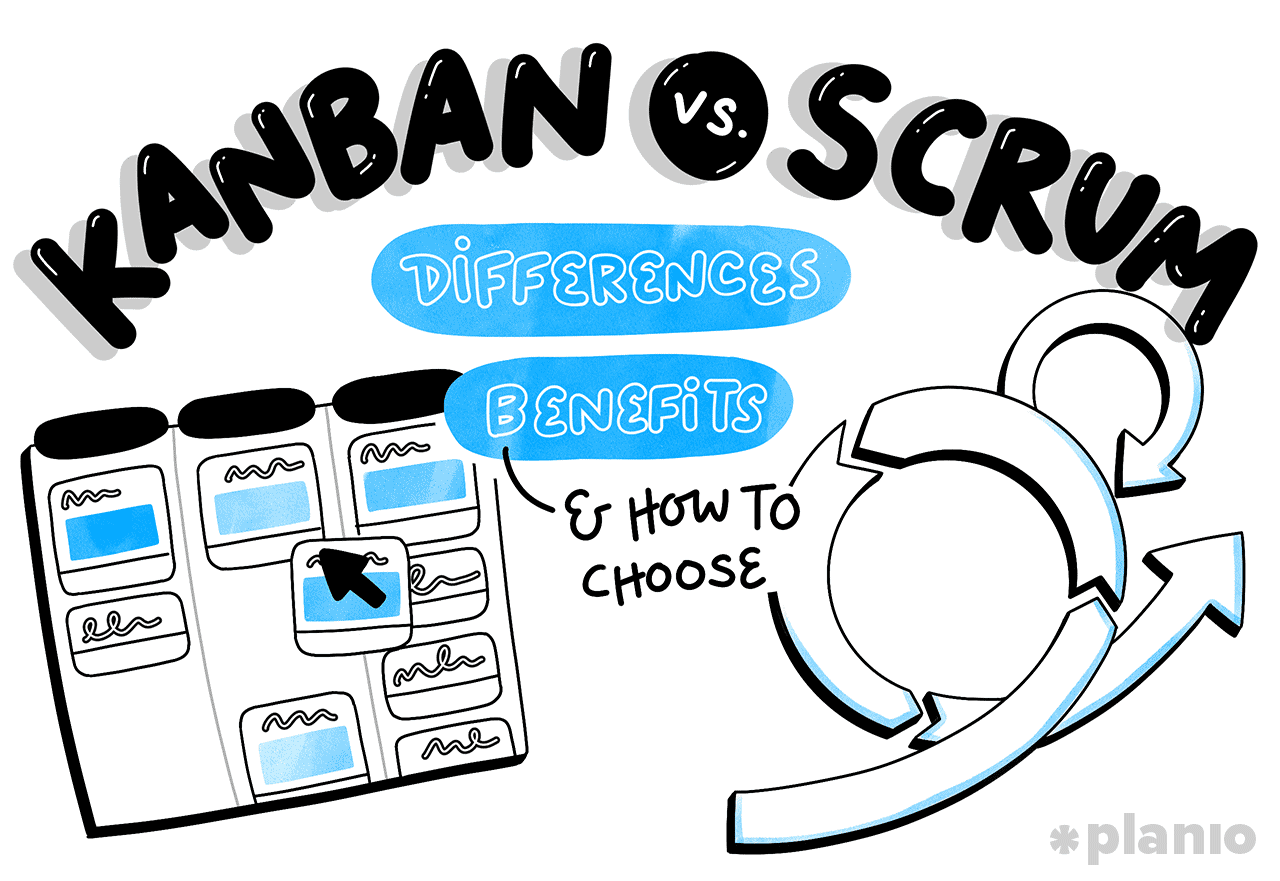
In the most recent State of Agile survey, 71% of teams agreed that using Agile methodologies helps them accelerate deliveries. But there’s one thing they can’t totally agree on: whether Kanban or Scrum is the better Agile methodology.
At a high level, the difference between Kanban and Scrum comes down to this:
- Kanban is a visual project management method using a board (physical or digital) to track tasks, manage work-in-progress (WIP), and improve efficiency.
- Scrum is an iterative framework used to deliver value in small, usable increments through short work cycles called “sprints”.
In our experience, teams are rarely dogmatic about their approach, pulling elements from both Scrum and Kanban to guide their workflow. And that’s the best case scenario.
While it’s important to understand the differences between Agile methodologies, it’s more important to match your process to your team’s DNA. Whether you’re building a complex software product or managing a creative marketing campaign, the right choice is the one that maximizes your team’s efficiency, output, and enjoyment.
Jump to a section:
Kanban vs. Scrum: At a glance comparison
Before we look at the differences, it’s very important to call out that Kanban and Scrum are both aligned to the Agile Manifesto. They both aim to get delivery teams away from slow, delay-ridden delivery and take advantage of the flexible nature of modern technology.
Both Scrum and Kanban support these core Agile pillars:
- Autonomy: They give teams the power to decide how the work gets done.
- Transparency: They make work visible so there are no ‘hidden’ delays.
- Iterative delivery: They prioritize getting working software (or other deliverables) into the hands of users as fast as possible.
- Continuous improvement: They’re constantly looking for ways to do things better, to ultimately make teams more efficient and better delight their stakeholders.
However, the way they achieve these outcomes is a little different.
You can think of Kanban like a continuously flowing stream, where you work to make the water (i.e., the work) flow as smoothly and as quickly as possible. On the other hand, Scrum is like a relay race, broken into short, intense bursts of activity that deliver incremental outputs.
To illustrate these differences, let’s compare the core features and elements of Kanban and Scrum side-by-side:
| Feature | Kanban | Scrum |
|---|---|---|
| Origin | Japanese manufacturing theories, namely from Toyota in the 1940s and 50s | Software development in the late 1990s |
| Who it’s best for | Teams with high-demands that need an efficient way to manage work | Teams building products with clear goals but that need some test-and-learn to get there |
| Key principles | Work visualization, limiting work in progress (WIP), and managing flow | Commitment, collaboration, autonomy, trial and error, efficiency |
| Cadence | Continuous flow (no set intervals) | Regular "sprints" (usually 2-4 weeks) |
| Value delivery | Continuous delivery or whenever each task is done | At the end of every sprint |
| Required roles | Role agnostic | Scrum Master, Product Owner, Developers |
| Change management | Changes can happen at any time | Sprints are planned — once a sprint is underway, it shouldn’t change |
| Primary metrics | Cycle Time and Lead Time | Velocity (how much work per sprint) |
| Work limits | Limited by “Work in Progress” (WIP) limits | Limited by what fits in a Sprint |
While these high-level descriptions are a great starter, to make your decision between Kanban and Scrum, you need to go deeper. Let’s dive into each one to explore exactly how they work, pros and cons, and how to put them in to practice.
While it’s important to understand the differences between Agile methodologies, it’s more important to match your process to your team’s DNA.
What is Kanban? How it works, pros and cons, and practical applications
Kanban (literally “signboard” in Japanese) started on the factory floors of Toyota with a simple goal: create a system to only build what is needed, when it is needed, and in the amount needed.
In project management, Kanban has taken this initial concept and applied it to “knowledge work,” empowering teams to better track their tasks from start to finish.
How Kanban works: Key principles, deliverables, and cadence
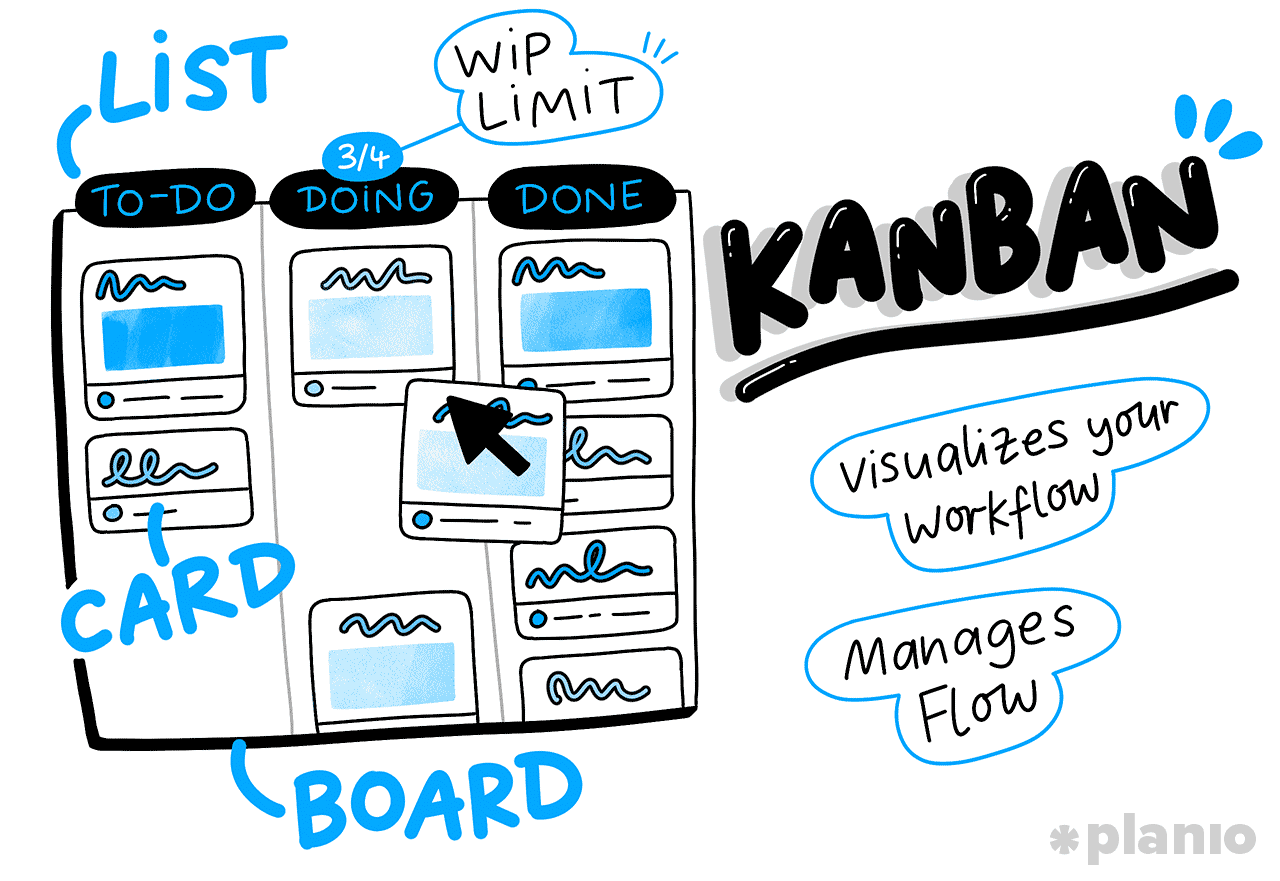
The heart of Kanban is the Kanban board. This is a simple way to define the different stages of development (usually something along the lines of “to-do”, “doing”, and “done”), and track your tasks (as “cards”) as they move through each one.
Sounds simple, right? That’s because it is.
Kanban is designed to help you and your team to:
- Visualize your workflow. You can’t manage what you can’t see. By putting every task on a card and moving it between your process stages, the whole team sees exactly where everything is (and any bottlenecks).
- Limit Work in Progress (WIP). This is the USP of Kanban, setting a limit on how many items can be being worked on at once. This forces the team to finish old tasks before starting new ones, reducing the number of spinning plates and increasing focus and quality.
- Manage flow. Through visualization and managing WIP, you move the focus from “Who is busy?” to “How fast is work moving?” Project teams track cycle time (i.e., how long an average task takes), working to optimize their efficiency, thus allowing them to get through more work.
There are no set roles in Kanban, so you don’t need to recruit or retrain. Instead, your team stays as it is, overlaying the Kanban methods and principles onto your existing way of working.
Why choose Kanban? 5 biggest benefits
- Flexibility. If a high-priority change comes in, you can pull it into the to-do list immediately. You may need to deprioritize something else to stay within your WIP limit, but Kanban offers great flexibility.
- Reducing waste. Because you’re limiting WIP, your team isn’t constantly context-switching between ten different tasks. This improves efficiency and reduces wasted time.
- Easy to start. You don’t need a massive cultural shift to get started with Kanban, just a slight tweak to visualize your processes and think differently about workloads and flow.
- Continuous delivery. It’s great for “business as usual” environments as well as projects. Especially if you’re working to release small updates or fixes constantly.
- Visual clarity. Kanban provides an instant “health check” of the project. If the testing column is full of cards, you know exactly where the team needs to put focus and help out.
The downsides of Kanban: 4 drawbacks
- Can feel aimless. Without specific deadlines, some teams find that work drifts and takes longer than it should. It sometimes requires additional leadership support to keep team motivation high by creating interim goals and success points.
- Board maintenance. If the board isn’t updated in real-time, it becomes useless. It requires high discipline and engagement to keep it working efficiently.
- Lack of structure. For teams that need a clear definition of done or a structured and effective meeting schedule, Kanban can feel a bit too loose.
- Bottleneck sensitivity. A single slow-moving task can block the entire flow if WIP limits aren’t managed correctly.
Case study: Kanban in the real world
CreativeStream is a mid-sized marketing agency. They handle a mix of planned campaigns and reactive emergency requests from clients (like a quick social media graphic or a copy change). Before Kanban, their schedule kept getting derailed by “urgent” client requests. They switched to Kanban, implementing a WIP limit of three tasks per client. When a client sends an “urgent” request, the account manager puts it at the top of the “To Do” queue.
The design team finishes their current task, looks at the top of the list, and pulls the new urgent item in. No more broken plans, and the clients are happier with the faster turnaround.
Putting Kanban into practice with Planio
Planio’s project management tool makes Kanban even more intuitive thanks to the dedicated Agile Board functionality.
Here’s how you can get started with Kanban boards in Planio:
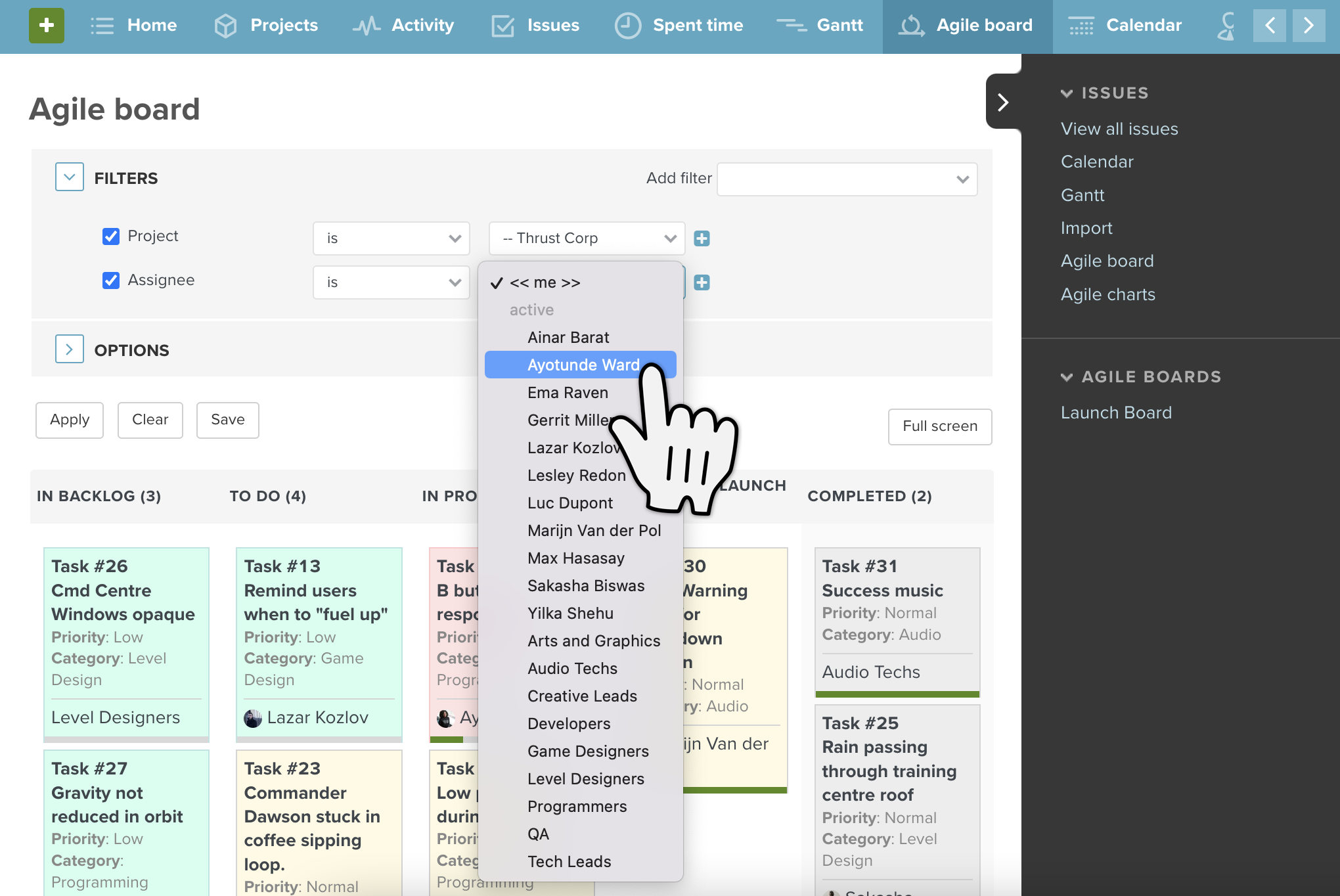
Set up your board: First, configure your Agile Board with your process steps. As you can see below, we’ve created columns for Open, Working On It, Waiting for Review, and Complete.
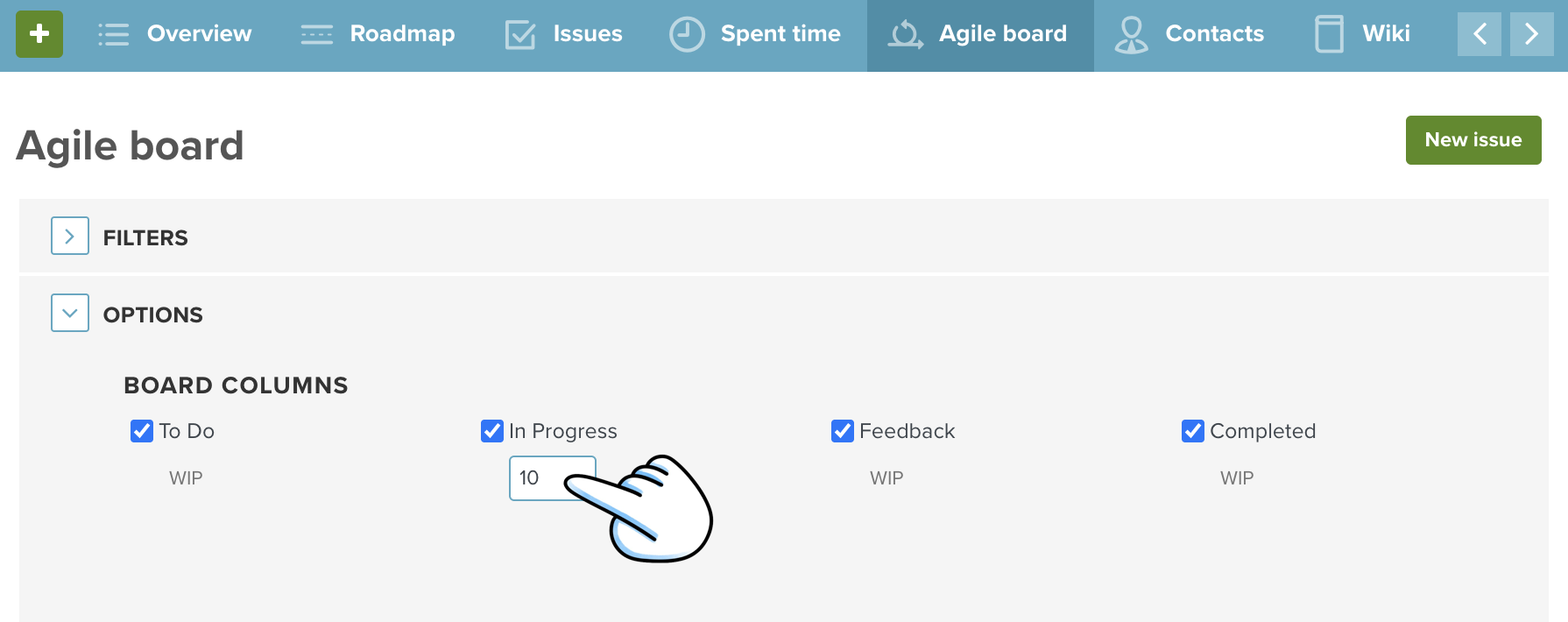
Set WIP limit: To manage your WIP and flow, next set your WIP limit for each process step. In this example below, we’ve kept Open, Feedback, and Closed as unlimited, but put a ten-task limit on “In Progress” items. This forces team members to be aware of the number of tasks being tackled at once.
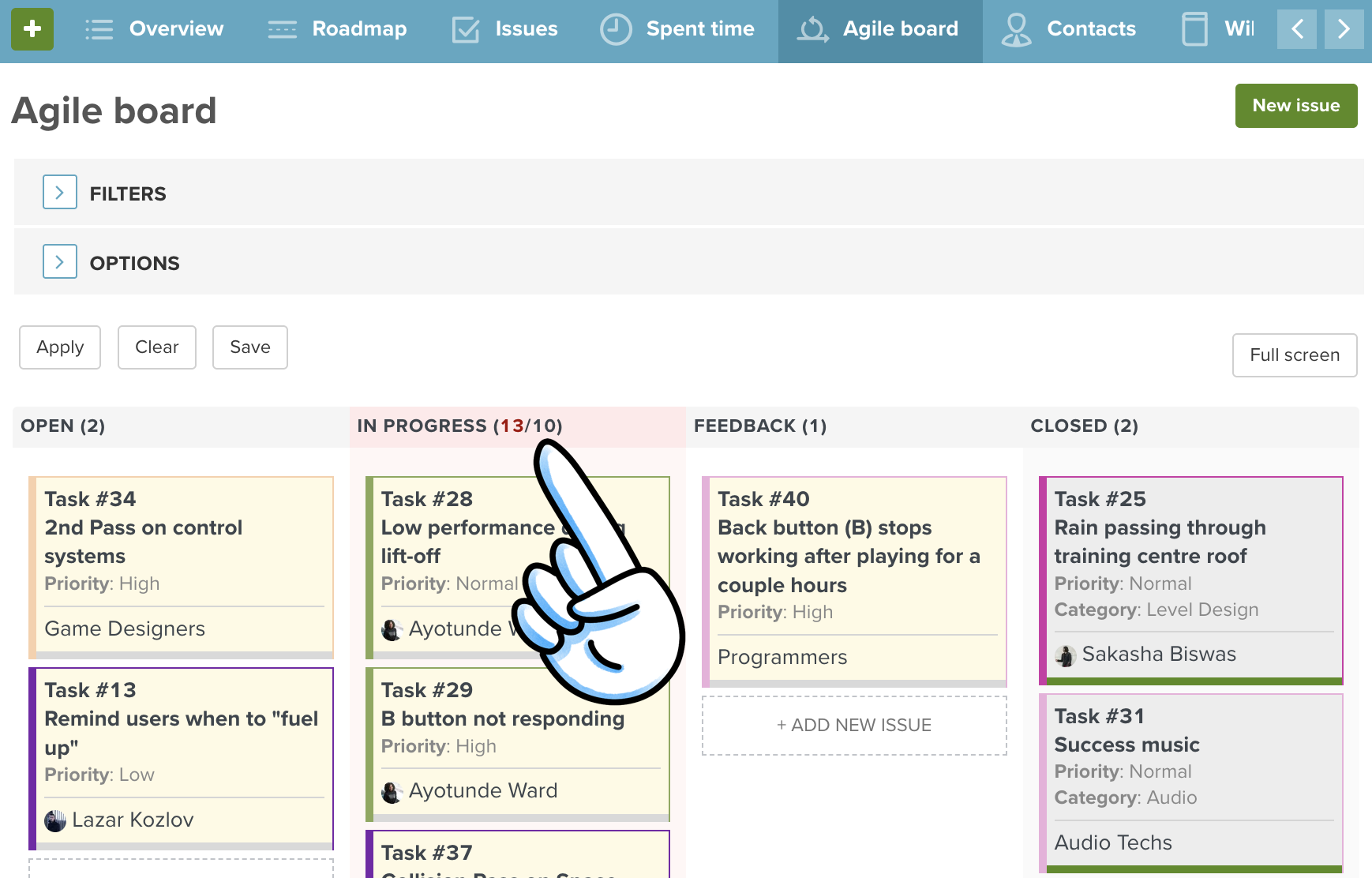
When the limit is overstepped, the colum becomes red.
Check the cycle time of issues using the Agile Chart: Velocity
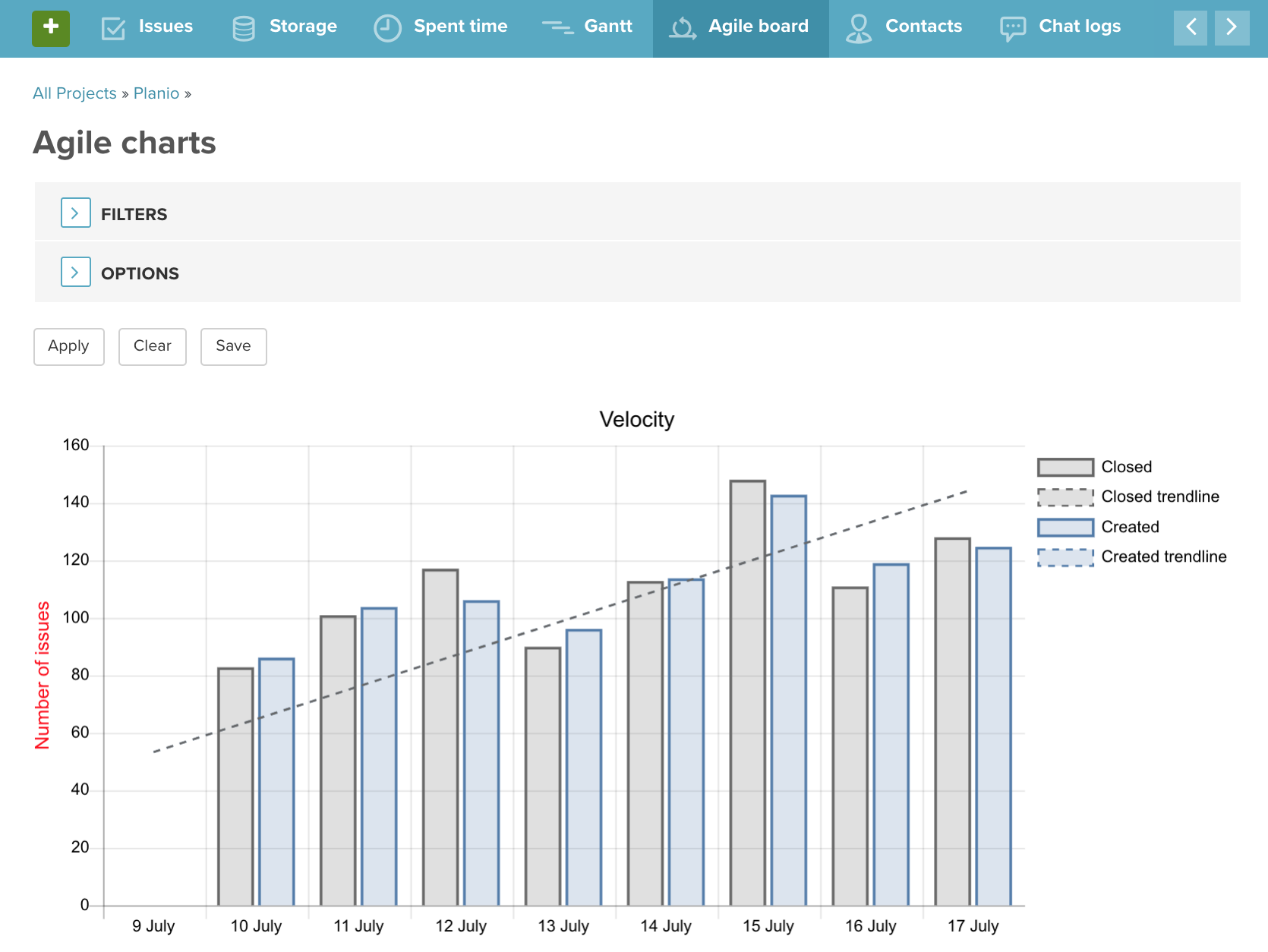
Educate the team: Check out our guide on Kanban boards and the psychology of cards to help your team better understand Kanban and get started with optimizing your workflow.
What is Scrum? How it works, pros and cons, and practical applications
Scrum is a framework designed to help teams work together to solve complex problems through “sprints.” These sprints are short, time-boxed periods where the team commits to finishing a set amount of work.
You can think of it this way: If Kanban is like a flowing river, Scrum is more like a sprint relay race.
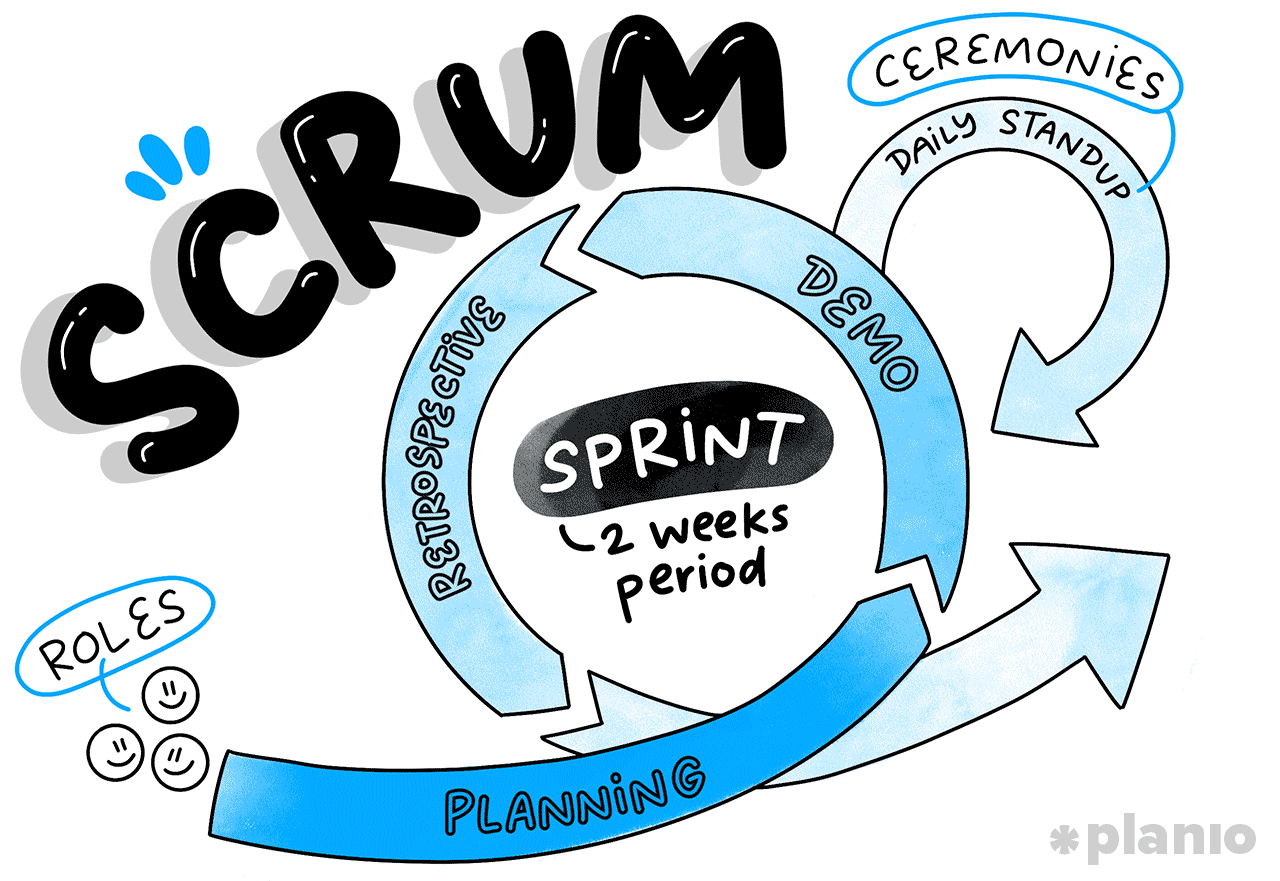
While Scrum is very specifically tailored towards software development, it’s not impossible to use it for other projects and non-project use cases.
How Scrum Works: Roles, Artifacts, and Ceremonies
Scrum is more prescriptive than Kanban, following a defined framework that includes specific team roles, ceremonies, and deliverables to help software teams thrive.
The core elements of Scrum include:
- Roles: Scrum teams include a Product Owner (responsible for defining what gets done), a Scrum Master (the coach who helps the team work effectively), and Developers (the doers that write and test the code).
- Sprints: A fixed period (usually 2 weeks) where teams decide what to build and focus on completing it. Once the sprint starts, the goals shouldn’t change, giving a baseline to measure your output against.
- Ceremonies: Daily Stand-ups (the daily check-in), Sprint Planning (the planning meeting), Sprint Review (the demo to approve what’s been done), the Sprint Retrospective (the what could we do better review), and the Backlog Refinement (what do we do next visioning) are the key Agile ceremonies that Scrum follows to make it a success.
Why choose Scrum? 5 biggest benefits
- Predictability. Because you work in sprints, stakeholders know exactly when they’ll see new features. It also helps teams stay organized and develops a ‘velocity’ of output that can be measured over time.
- Higher focus. Thanks to the structure and the role of the Scrum Master, the development team is shielded from outside distractions for the duration of the Sprint.
- Built-in improvements. Sprint retrospectives ensures teams are constantly talking about how to get better. This fosters a continuous improvement mindset and helps improve output over time.
- Clear ownership. The roles of Product Owner and Scrum Master clarify who is responsible for what, reducing “too many cooks” syndrome and leaving developers to focus on building and testing.
- Motivation. Working in short, sharp bursts keeps motivation and energy high, with the fortnightly sprint goal providing a regular sense of accomplishment for the team.
The downsides of Scrum: 4 drawbacks
- Meeting heavy. Between planning, grooming, stand-ups, and retros, some teams feel like they spend more time talking than doing.
- Inflexibility. If a high-priority item comes in mid-sprint, it should wait until the next sprint, which can frustrate clients.
- Scope creep. If the team underestimates a task, they end up with “carryover” into the next sprint, which can demoralize the team.
- Role dependency. If you have a bad Scrum Master or an absentee Product Owner, the framework can fall apart quickly.
Case study: Scrum in the real world
FinTechFlow is a fictional startup building a new mobile payment app. They have a massive backlog of complex features (biometric login, bank integrations, etc.) and don’t know where to start.
They use Scrum to improve focus and clarity. Every two weeks, they commit to building one specific feature, not getting distracted by anything else.
By the end of the sprint, they have a working and tested onboarding flow to show their investors. This cadence keeps the team motivated, removes analysis paralysis, and ensures they build an effective product.
Putting Scrum into practice with Planio
Much like Kanban, Planio is the perfect place to implement Scrum thanks to its flexible, Agile-focused setup.
Here’s how you can get started with Scrum in Planio:
Backlog management: First, build a backlog of tasks and features within the Agile Board. Simply select ‘Sprint Planning’ and begin creating features (as issues) that you want to work on in the coming weeks and months.
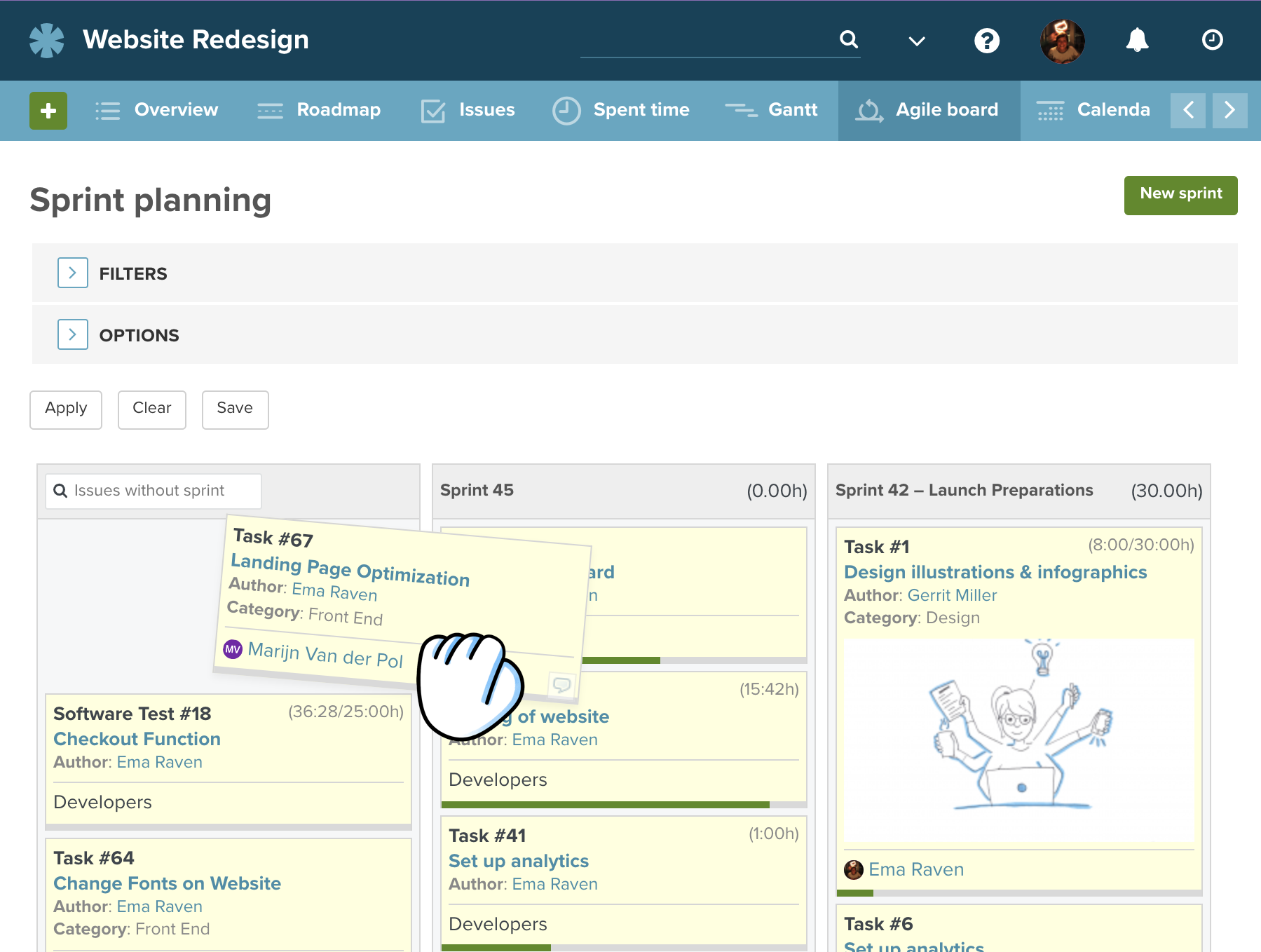
Sprint tracking: Within your current sprint, use the Agile board we saw in Kanban to manage your specific tasks, moving them to the correct status as you work through your sprint.
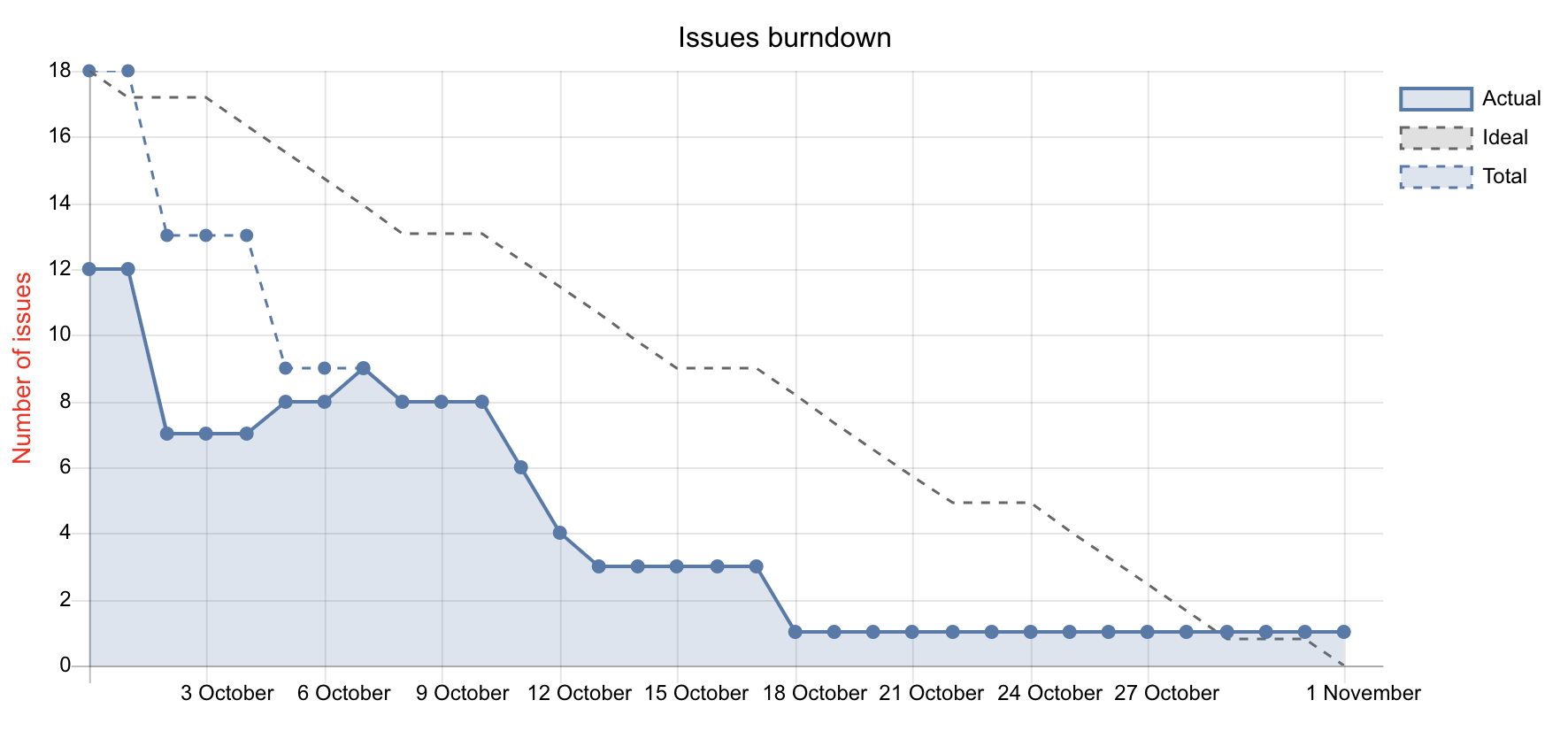
Charts and reporting: Planio automatically generates burn-down charts so you can see if you’re on track to hit your sprint goals. As you get better and better at Scrum, you’ll be able to compare past performance, identify trends, and optimize efficiency.
How to choose between Kanban vs. Scrum
So, now you know a bit more about Kanban and Scrum, how do you know which one is right for you? It’s rarely a black-and-white choice. Often, the nature of your project, your team’s maturity, and even organizational culture will dictate the path.
As the team at the Scrum Alliance often says, the choice comes down to how much “change” you’re managing and how much “structure” you need.
Choose Kanban if:
- Your work is highly reactive (e.g., support tickets, creative requests)
- You want to start improving your process without changing everyone’s job titles
- You need to be able to change priorities at a moment’s notice
- The “continuous flow” of delivery is more important than a “big reveal”
- You’re working on topics that aren’t software development
Choose Scrum if:
- You are building a complex product that requires focused work
- Your team benefits from a clear, predictable structure and regular deadlines
- You need to provide regular, timed updates to stakeholders
- You struggle with focus and need to protect your team from outside interference
Food for thought: Many modern teams use “Scrumban”, a combination of the structure and roles of Scrum (sprints and retrospectives) but applying Kanban’s WIP limits and visual boards to manage the daily flow. This can be a best of both worlds approach, especially for established teams that like a good balance of structure and autonomy.
Get teams away from slow, delay-ridden delivery and take advantage of the flexible nature of modern technology, with Agile.
Kanban or Scrum? With Planio, the choice is yours
While many organizations use Agile to deliver their projects, there’s still a lot of debate about Kanban and Scrum. Both have their pros and cons, so it’s best to choose a framework based on your team, your objectives, and your organization’s ways of working.
Whichever way you go, Planio is ready to help you and your team build great products. Whether it’s optimizing WIP and flow with Kanban or planning and delivering fast-paced sprints in Scrum, the Agile Board has the structure and flexibility to meet your needs.
But the real advantage is that over time your team’s needs will change. You might start with Scrum while you’re building a new product and then transition to Kanban once you move into maintenance and support.
With Planio, you don’t have to switch tools or retrain your team when that happens because we can do both Kanban and Scrum.
Try Planio with your own team today — free for 30 days (no credit card required).